

Hiring someone (or a team/company) to produce a 60 second professional promotional or product video for your organization can range in costs typically between $1,500 and $20,000. As an organization dedicated to social impact, that’s often an expense you can’t budget for.
But with AI tools and savvy prompting, today, anyone can make a professional looking video. At least one that checks the boxes without breaking the bank. We take you through our end-to-end process in making one, learning as we go.
So you can recreate it.
Quick notes
-We’re not professional designers, video editors, coders, or content creators; just scrappy entrepreneurs and problem solvers with some marketing backgrounds.
-We probably could have followed better practices in creating more optimized prompts for AI, but what we did here worked for our purposes (and the 80-20 rule)
-Our workflow involved
Using standard stock images and videos
Sourced from tools like Canva and Unsplash
Using existing images and videos
Sourced from the organization we made the video for
Generating new images with AI
Using ChatGPT/DALL-E
Generating short video clips
Using tools like Runway ML and Google’s Veo
Putting all of the pieces together with Capcut’s video editor
Want more AI guides, tutorials, and live action use cases, direct to your inbox?
Here’s the process Daniel from the Fundraising Dispatch team followed in order to develop this overview video for our friends at Global South:
1. I asked ChatGPT
I'm going to make a marketing / promotional video for one of the organizations I work with. What is the recommended process that video production companies / agencies follow? The idea is that they usually write a storyboard / script first right?
It gave me a full summary (redacted a little bit to keep things short here).
Yes — you’re absolutely right. The most effective marketing and promotional videos always follow a structured pre-production process before filming or editing starts. Agencies and production companies typically use a proven framework that helps ensure clarity, consistency, and results.
Here’s a recommended end-to-end process used by pros:
🎬 Professional Video Production Workflow
(For marketing/promo videos — adaptable for live-action or animated)
🧠 1. Discovery & Strategy | Goal: Understand the client, audience, and objective.
What is the goal? (Brand awareness, product launch, conversions?)
Who is the target audience?
What platforms will the video appear on? (Instagram, YouTube, Website, etc.)
What is the CTA (Call to Action)?
📄 Deliverable: Creative brief or strategy doc
✍️ 2. Scripting & Storyboarding | Goal: Plan the story, structure, and visuals before production.
Script Writing
Written like a screenplay (voiceover + on-screen dialogue or titles)
Include structure: Hook → Problem → Solution → CTA
Storyboarding
Visual sketches or frames matching the script
Helps pre-visualize scenes and transitions
Can be done in Canva, Figma, Google Slides, or traditional sketch
📄 Deliverables: Final Script + Storyboard Deck
🎥 3. Pre-Production | Goal: Prepare everything needed before shooting or animation.
Schedule shoot dates
Scout locations / Confirm studio or remote assets
Cast talent or record voiceover
Gather branding assets (logos, fonts, colors)
Plan B-roll, props, wardrobe, etc.
📄 Deliverables: Shot list, production schedule, asset checklist
🎬 4. Production (Filming or Asset Creation) | Goal: Capture or build the visuals.
For live-action: Shoot according to script + storyboard
For animation: Begin creating scenes/assets
Record voiceover or sound bites
📄 Deliverable: Raw footage or animation scenes
🎞️ 5. Post-Production | Goal: Edit and finalize the video.
Video editing (CapCut, Premiere Pro, Final Cut, etc.)
Add text overlays, transitions, animations
Sync with music or sound effects
Apply brand look and feel
Color correction, audio mixing
📄 Deliverables: Rough Cut → Final Cut → Final Delivery File
📤 6. Review, Feedback, and Export
2. So I started to put together my outline and the start of my script:
I knew I had to:
Tell a story visually
Introduce the problem (my compelling hook)
Showcase the solution (why us, why now)
Highlight the traction and impact
Hit a CTA
3. That’s when I realized… I’m going to need to generate some images
People don’t buy products—they buy stories. And video tells stories better.
– Michael Stelzner, Social Media Examiner
Just like your deck outlines the problem you solve before crafting your “why us, why now,” a video, to capture your audience’s attention and pull on the right strings should do the same.
Rightfully so, the majority of the visuals readily available from the organization focused on their solutions and the success of their work and farmers, not the broken system they’re trying to fix.
To tell a complete story, I needed “footage” that further illustrated the challenges. Rather than having the organization stage or recreate them… I knew that existing stock photos/videos combined with some creative uses of AI could help showcase the story behind their impact and the need for their powerful solution.
So I went back to ChatGPT:
Act as an expert video storyteller and AI prompt generator. What are good prompts I can use to feed back to you, ChatGPT, to generate images I can later use to generate videos for b roll in a video project to support my client who works in combating food waste in agriculture.
GPT:
Absolutely — here’s a full guide to help you generate AI images for B-roll using prompts that support your client’s mission of combating food waste in agriculture.
These prompts are designed for tools like DALL·E, Midjourney, Runway, or Pika, and work great for creating visuals you can stitch into animated or narrated video content.
🎬📷 AI Image Prompt Themes for B-Roll on Agricultural Food Waste
🧺 1. Wasted Harvest / Spoilage
Great for emphasizing the problem visually.
Prompt: "Rotting tomatoes and spoiled vegetables scattered on a dirt farm path, flies buzzing, overripe produce discarded after harvest — cinematic natural lighting, rural background"
Variation: "Mounds of uneaten bananas turning black in a rural African market, shot from above, environmental documentary style"
🏚 2. Inefficient Storage Systems
Shows what leads to post-harvest loss.
Prompt: "Leaking wooden grain silo in a rural African village, spilling maize onto the ground — overcast skies, photojournalistic realism"
🌽 3. Surplus / Overproduction Without Buyers
Highlights the paradox of abundance and loss.
Prompt: "Overflowing crates of unsold tomatoes in a rural marketplace, no customers in sight, golden hour lighting, empty atmosphere"
🧑🏽🌾 4. Farmers Experiencing Loss
💡 5. The Opportunity: Solutions / Innovation
Prompt: "Cold storage solar-powered container in the middle of a rural farmland, young farmers unloading crates of fresh produce, success scene"
🚜 6. Logistics / Transportation Challenges
🌱 7. Before/After Contrasts
🎥 Recommendations for Use in B-Roll
Style: Use “cinematic lighting,” “documentary realism,” or “shallow depth of field” for more natural footage-like appearance.
Color: Stick with natural lighting and earth tones for an authentic feel.
Aspect Ratio: Generate at 16:9 (landscape) to save editing time later.
4. But I’ve seen this before. I needed better prompts to get better outputs/results
Me:
I really like your first four prompts. Should you expand on them with more detail to be able to generate great images that I can use later for videos?
GPT:
🧺 1. Wasted Harvest / Spoilage
🎯 Theme: Problem → Visual shock → Emotional impact 🎨 Master Prompt:
“Rotting vegetables and overripe fruit scattered across a dirt farm path, including spoiled tomatoes, wilting lettuce, moldy cucumbers, and squashed mangoes. Flies hover in the warm air. The background shows an abandoned crate tipped on its side, empty farmland behind. Early morning golden hour light, cinematic realism, wide shot with shallow depth of field, dusty rural environment, documentary-style composition.”
🔄 Variations:
Add: “close-up of a single rotting tomato covered in white mold, soft focus”
Add: “half-covered by plastic tarp, partially sun-dried, decomposing in layers”
Swap lighting to: “harsh midday sun casting dry shadows”
Replace environment: “in a rural open-air market stall, empty of customers”
🏚 2. Inefficient Storage Systems
🎯 Theme: Systemic failure → Infrastructure gaps 🎨 Master Prompt:
“A dilapidated wooden grain storage structure in a Sub-Saharan farming village. Sacks of maize spill from torn burlap bags, some visibly moldy. The floor is dusty, cracked. A rusted tin roof lets in beams of sun through holes. The image captures ambient neglect and fragility. Shot from a low angle, late afternoon light, handheld-style framing with cinematic grain, muted earth tones.”
🔄 Variations:
Add: “banana bunches ripening too quickly, black spots spreading, no refrigeration”
Swap crop: “sacks of cowpeas or millet rotting from bottom up”
Add character: “young farmer inspecting damage with a worried expression”
🌽 3. Surplus / Overproduction Without Buyers
🎯 Theme: Ironic abundance → Economic disconnect 🎨 Master Prompt:
“Dozens of overflowing wooden crates filled with freshly harvested but unsold tomatoes stacked in a rural roadside market. No customers in sight. Some tomatoes are bruised or beginning to rot. Flies gather on the surface. A bored vendor slouches in the background, fanning themself in the heat. Shot from above and slightly to the side, natural light filtering through makeshift tarps, rich red and green colors against dusty browns. Cinematic realism, photojournalistic tone.”
🧑🏽🌾 4. Farmers Experiencing Loss
🎯 Theme: Human impact → Emotional weight → Personalize the issue 🎨 Master Prompt:
“A smallholder African farmer, mid-40s, wearing a wide-brimmed hat and worn shirt, sits beside several sacks of spoiled maize and wilted greens. The farmer is hunched forward, hands covering face in frustration. Behind him, empty market stalls suggest low demand. A faded signboard hangs overhead. Golden hour lighting from the side casts long shadows, capturing the emotion of quiet despair. Shallow depth of field, neutral color palette, editorial photojournalism look.”
🔄 Variations:
Change emotion: “instead of frustration, show exhausted determination — wiping sweat from brow”
Add community: “two farmers talking quietly, holding spoiled crops between them”
Gender variation: “female farmer with child on back, sorting through spoiled produce”
🧠 Expert Tips for Visual Consistency (for later video use)
Use consistent lighting cues: e.g. always "golden hour," "documentary realism"
Keep camera perspective in mind: vary between wide shots, medium scenes, and close-ups
For each of these prompts, try generating 4–6 angles (establishing, human-focused, detail/macro, reaction)
Side note: we share more on effective prompt writing
Here:

And here:

5. Then I plugged each prompt one by one into GPT’s image generator


And the output… I could work with.

So I kept going. Asking ChatGPT to coach me into giving it prompts for optimized pictures… based on the story I wanted to tell:
Now how about some prompts to showcase the actual land and produce growing. This will serve as b roll to support the claim: “In Kenya, potato (the country’s second most important food crop - after maize) yield has fallen from 21 tonnes per hectare in 2008, to 8 T/ha today. A reduction of more than 60%.”
And the result:

Now, I had enough to start the process of making a video. I knew the tool to use but I didn’t have the skills to use it correctly.
6. So I had Chat GPT help with me prompts to (now) turn those images into B ROLL video clips.
Me:
Ok. Now. Continue your role as an expert video storyteller, editor, and AI video generation specialist. What prompt do I need to feed into Runway ML (alongside these images) to generate effective B ROLL for my purposes?
GPT:
Absolutely — now that you've got these powerful stills capturing food loss, drought, and smallholder farming challenges, the key to using Runway ML (or similar video-generation tools like Pika or Sora) is prompt precision.
Here’s how to craft Runway-ready prompts that turn your images into smooth, cinematic B-roll that supports your food waste in agriculture story:
🎬✅ GENERAL STRUCTURE FOR RUNWAY B-ROLL PROMPTS
Format: [Subject] performing [Action] in [Setting], captured with [Camera Style] and [Mood]
🔑 KEYWORDS TO INCLUDE IN RUNWAY PROMPTS
ElementExample KeywordsSubject“Kenyan farmer”, “rotting potatoes”, “stacked crates of produce”Action“inspecting spoiled crops”, “walking along cracked field”, “looking over produce”Setting“dusty farm road”, “rural marketplace”, “potato field in drought”Camera Style“cinematic drone shot”, “handheld close-up”, “shallow depth of field”Mood/Tone“documentary-style”, “quiet despair”, “warm natural light”
🔁 EXAMPLES BASED ON YOUR IMAGES
🧺 1. Rotting vegetables on farm road
Prompt: “Rotting tomatoes and spoiled vegetables scattered along a dusty Kenyan farm path, flies buzzing around, wooden crates tipped over in the background, golden hour light, handheld camera, cinematic realism, slow pan across produce”
🏚 2. Dilapidated grain storage
Prompt: “Inside a rural Kenyan grain shed with torn sacks of maize spilling onto the floor, mold visible, sunbeams shining through holes in the roof, slow zoom-in, documentary realism, muted earth tones, handheld film grain”
🧑🏽🌾 3. Farmer facing crop failure
Prompt: “African smallholder farmer stands in cracked potato field, hands on hips, surveying wilted plants, distant haze, dry air, cinematic drone pullback, warm but desaturated tones, tense emotional atmosphere”
🥔 4. Low-yield harvest
Prompt: “Close-up of African farmer holding small, underdeveloped potatoes in gloved hands, soil-dusted and dry, soft light, shallow depth of field, emotional focus on the fragility of the crop, film-style realism”
🧴 5. Marketplace with no customers
Prompt: “Open-air rural market in Kenya with unsold vegetables, vendor fanning herself in the heat, stacked crates of produce starting to spoil, wide-angle lens, natural overhead lighting through tarp, slow camera drift, subdued tension”
🎞️ BONUS: FOR USE WITH IMAGE-TO-VIDEO IN RUNWAY
If you're using image-to-video mode:
Attach the still (e.g. discarded potatoes, wilted field)
Use the exact prompt as written above
Consider adding:
"slight wind movement","natural camera shake","flies buzzing","sunlight flicker"— to increase realism
🧠 Pro Tips:
Keep prompts under ~50 words
Use documentary-style and real-world lighting cues
Add “slow camera movement” for emotional pacing
For post-harvest scenes, “flies buzzing”, “decay slowly spreading”, and “sunlight flickering through dust” work great
Want me to format these into a Runway-ready storyboard prompt sheet, or generate preview videos next using these prompt structures?
And here’s where I realized I made my first big mistake

My image was getting cut off before I could use it to create a video output in my intended format.
7. I had to go back to Chat GPT to make sure the images it gave me were in the right format 16:9, (1920 x 1080)
A quick fix. But I needed to do it for most of the images it had generated for me.
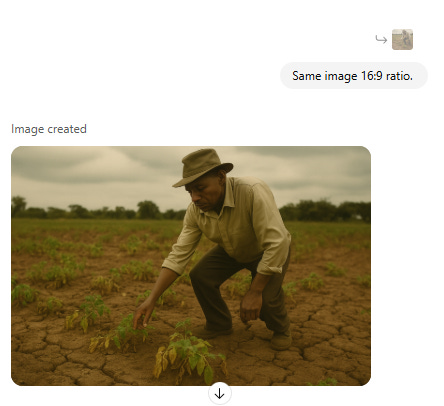
8. Now I was ready plug my optimized prompts into RunwayML (the video generation tool)
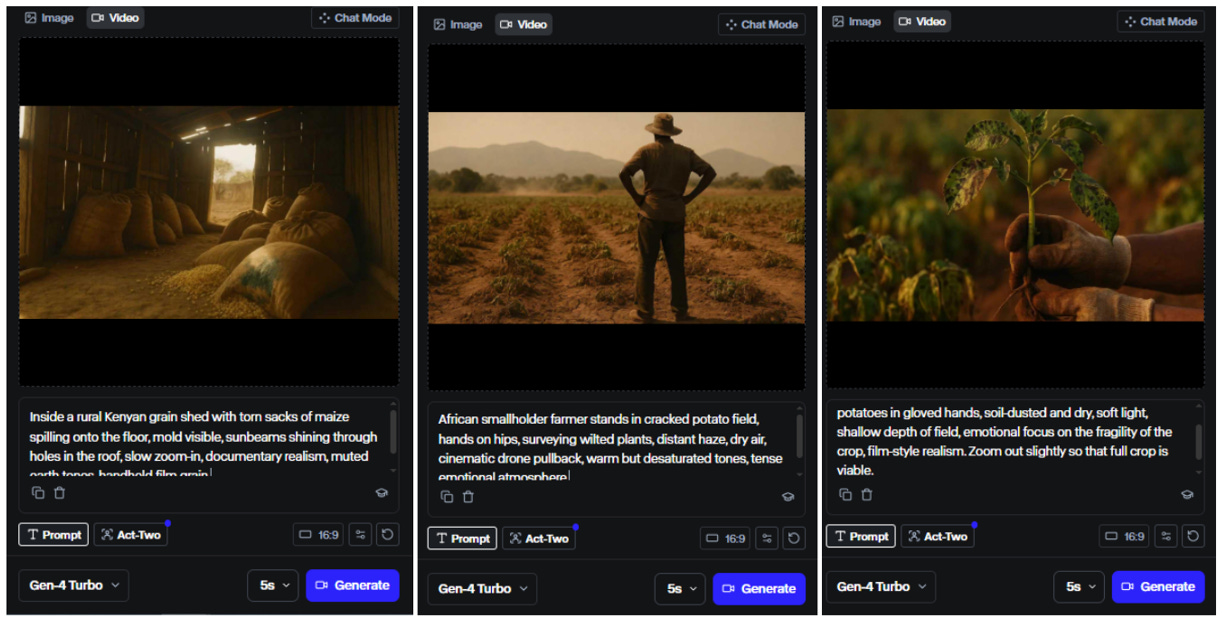
And here’s what I got.
*Note, I downloaded each output, spliced them together, and sped up each clip for the sake of this post (and your attention).
The results were pretty good… right? Minus this weird, random (I guess) bike…? That Runway decided was necessary in my video.

(It didn’t even have pedals…)
Well maybe their next video generation model will improve on this. 🤷♂️
9. So I obviously did some prompt refining and generated multiple outputs when I wasn’t happy with the results
And I kept moving along between ChatGPT and Runway.
Hey GPT: Help me make a prompt to generate an image to convey this idea.
Hey GPT: Ok; use said prompt to generate the image (16:9 Ratio please!)
Hey GPT: Great! now help me with a prompt to make the magic happen with Runway ML for this image. The prompt should be optimized for taking those images and putting them through (alongside the prompt) to Runway ML for the purpose of generating B - Roll for the 16:9 resolution promotional video.
Daniel: [Download the image]
Daniel: [Upload to Runway ML]
Daniel: [Paste the Prompt]
Hey Runway ML: Generate!
Daniel: [Enjoy Results]
Daniel: [Rinse and repeat - making any necessary edits]
Turning
Ideas into Prompts
Prompts into Images (and more prompts)
Images into Videos
10. I addressed some hiccups along the way
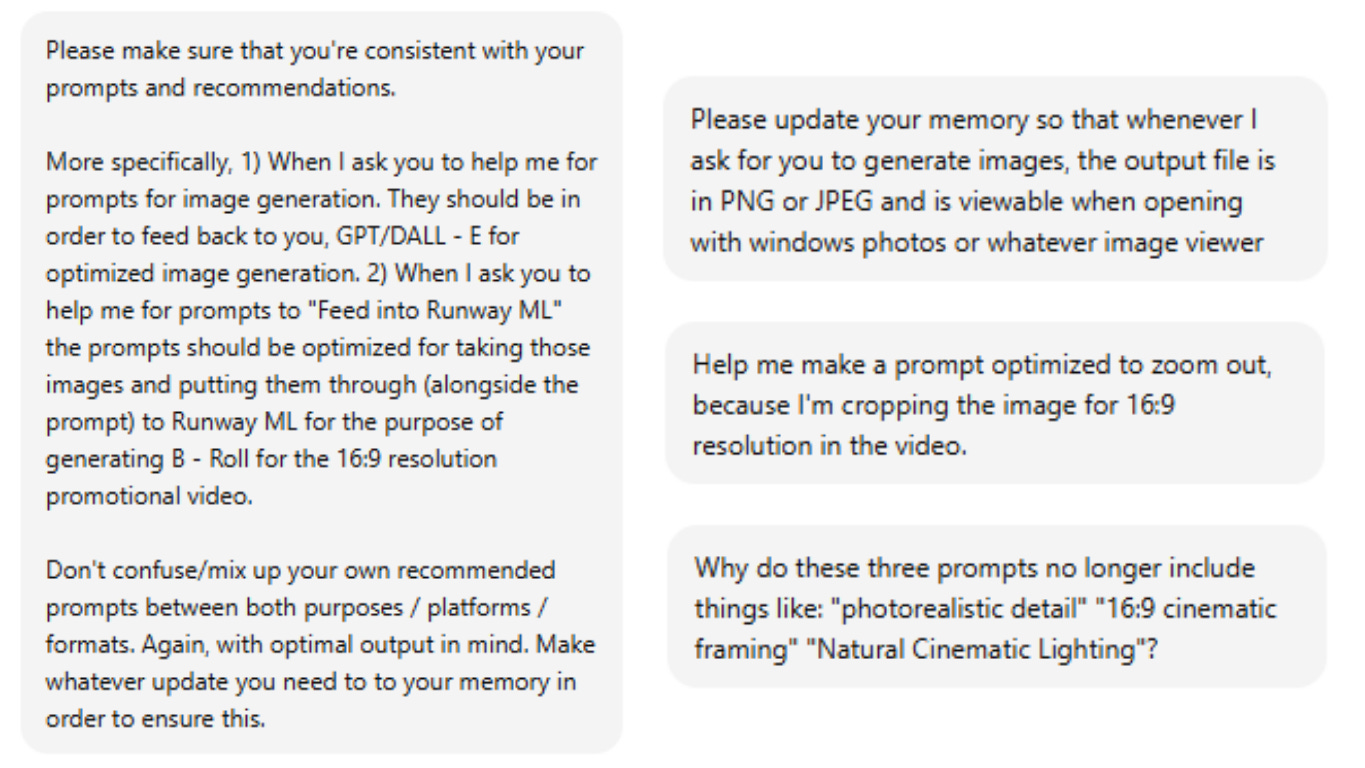
Was I being too mean to Chat GPT? I mean… I said… please.
11. And I repeated the whole process also using the organization’s assets and existing stock photos and videos
I.E.
I downloaded the organization’s images from their farms, labs, & cold storage facilities
I searched Google for more ideas and inspiration
And asked GPT to work its magic to help me with prompts for Runway.

Then, as I did before, I used Runway ML to create short 5 - 10 second video clips based on these images and prompts
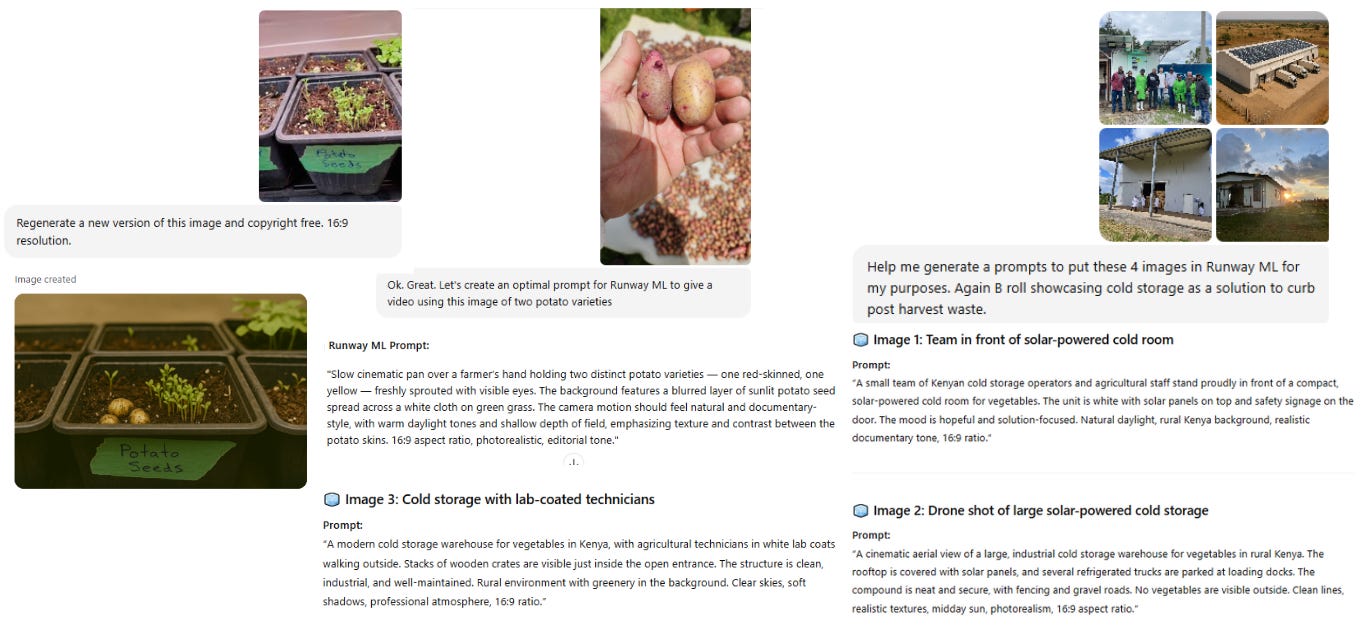
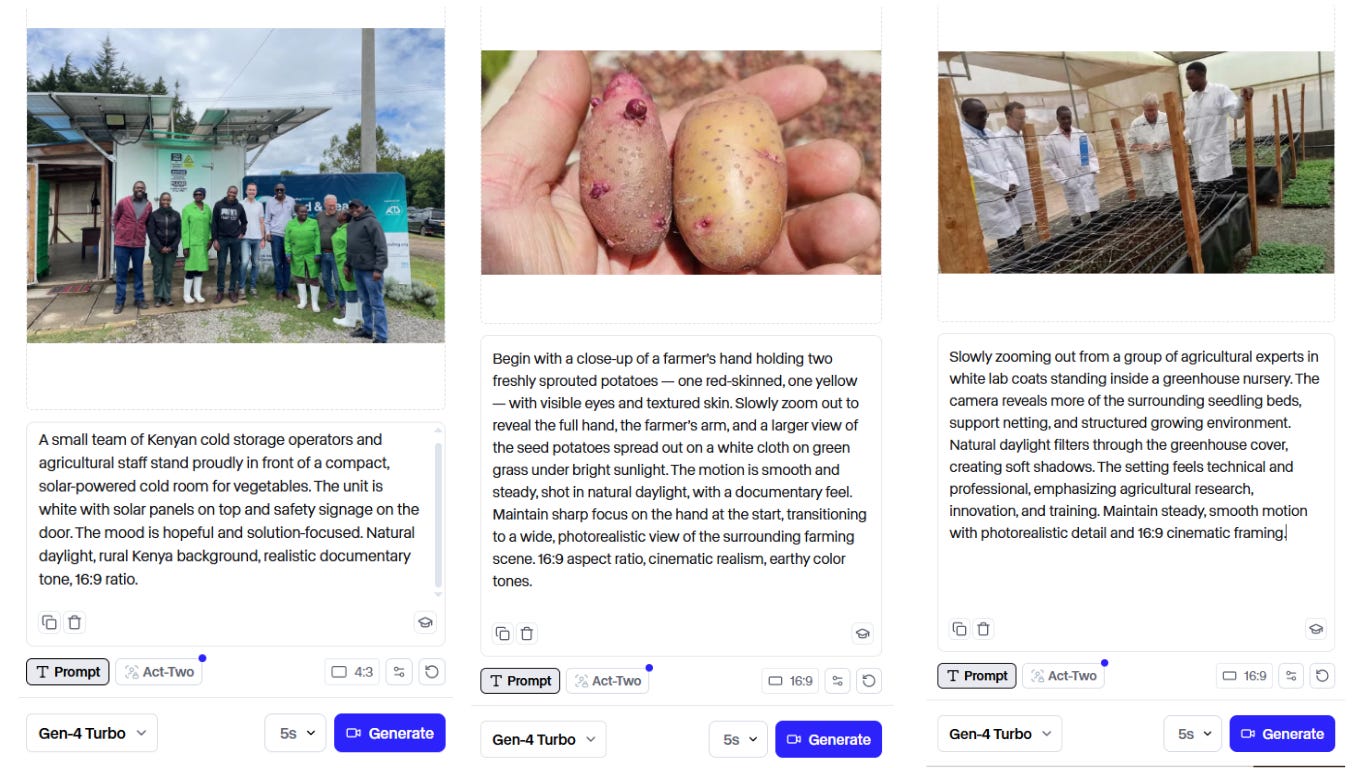
With the results looking like these short clips (made into gifs for the purpose of this post):


And I found and downloaded other relevant stock videos (for B roll) on Canva and Unsplash
12. Before finally… plugging everything into Capcut, following my script, and putting my video editing “cap” on.
And after some trial and error (let’s say 6 hours)… this was the final result!
See how Global South’s mission to reduce food waste and increase potato farmer income in Kenya was showcased in a video made with the help of AI.
That’s a wrap!
The entire process here took a fair amount of time, a lot of prompts, and plenty of trial and error, but resulted in a promotional video that would’ve otherwise cost thousands of dollars to contract.
The real lesson here:
You don’t need to be a designer, an editor, or a filmmaker to create powerful marketing assets anymore. You don’t need a studio. You don’t need a creative agency. You don’t need a production team.
You just need time, the willingness to experiment, a story to tell and the right AI tools in your stack.
The tools aren’t perfect. The outputs aren’t perfect. But they can be used for a cost-effective way to help your mission-driven organizations show funders and prospective customers/project partners what you do and why your work is necessary.
Want all of the above in a more direct step-by-step guide you can use to make your own marketing assets and promo video?
Paid subscribers will find a link to a document below.
Stay tuned for more walkthroughs, tutorials, and behind-the-scenes looks into building with AI.
